Imagine you want to capture a room. Not a photo of it, but the whole thing, so someone could look around it from any angle on their computer, like they were standing there. The old way to do that was to build a little digital sculpture: measure every surface, every wall, every chair, and stitch together millions of tiny flat triangles into a solid model. It works, but it's slow, expensive, and hard surfaces like glass, hair, smoke, and fuzzy edges come out looking wrong.
Gaussian Light Capture ("Light Capture" for short; engineers know it as Gaussian splatting, or 3DGS) throws that whole approach out. Instead of building a solid sculpture, it fills the space with a huge cloud of tiny colored blobs of light. Millions of them. Each blob is a little smudge that's brightest in the middle and fades out at the edges, kind of like a soft dab of colored chalk or a spray of mist. Each one knows where it sits in 3D space, what color it is, how big and stretched it is, and how see-through it is.
And it isn't only rooms
Anything that holds still long enough to be photographed…
Can be captured.
A room is just the easy example. The same trick works on almost anything that exists in physical reality. You're not capturing a floor plan, you're capturing a thing, whatever it is, so people can circle it and see it from every side.
- Your petThe dog frozen mid-yawn in a patch of sunlight, the cat on the windowsill: a three-dimensional moment you circle from any side.
- The people you loveA person captured exactly as they are, at this age, in full dimension.
- A product you're sellingTurned over and inspected from every angle, not five flat photos a customer has to squint at.
- Memorabilia & artifactsA coin, an heirloom, an archaeological find, captured so completely that a researcher or a grandchild can examine it decades later.
- A whole site from aboveA campus or property flown with a drone and turned into a living aerial map you swoop through and drop into.
- A moment worth keepingA place, a scene, an occasion, preserved as somewhere you can return and stand.
If light bounces off it, it can be captured.
By itself one blob is nothing. But pile up millions of them in exactly the right spots (this one red and here, that one brown and there) and from a distance your eye blends them into a photograph-perfect view of the actual subject. It's the same trick as a pointillist painting, where thousands of little dots of paint become a picture when you step back. Except these dots float in three dimensions, so you can walk around them and they still hold together.
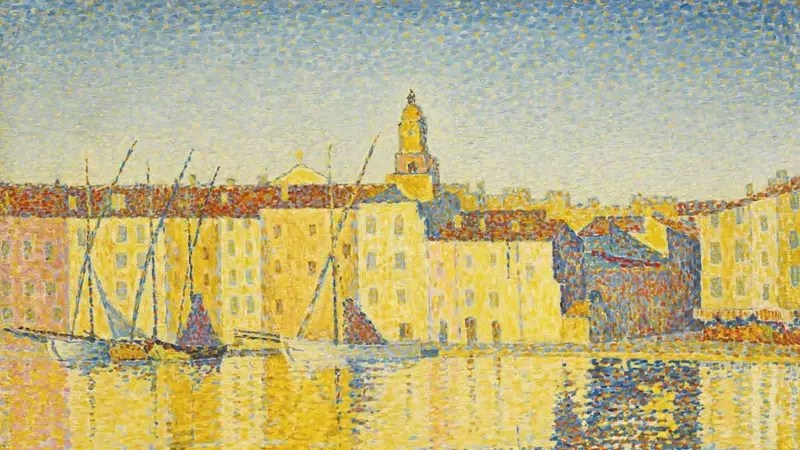
How the blobs find their places
The clever part is how you get those blobs in the right places. You take a bunch of ordinary photos or a short video walking around the thing you want to capture. Now, think about how you put together a jigsaw puzzle. You don't force pieces in at random. You look at the colors and shapes, you find the patch of blue that must be sky, the run of green that has to be grass, and you work out which pieces belong next to which by matching what's on them to what's around them. Little by little the picture assembles itself, because every piece has a right place and you keep testing pieces against their neighbors until they click.

Or picture a scrapbook collage, the kind where someone arranges hundreds of little instant Polaroid snapshots on a big board, and because each Polaroid is a slightly different shade, the whole arrangement, seen from across the room, forms one giant picture. A cluster of blue-ish photos becomes the sky, a run of green ones becomes the lawn, warm brown ones become a wooden floor. No single snapshot is the picture; it's the placement of all of them, each color in the right spot next to the right neighbors, that makes the big image appear.

That's what the computer is doing with the blobs, except it works in three dimensions and it does it by trial and error, millions of times over. It starts with a rough, messy scatter of blobs (puzzle pieces dumped out of the box, Polaroids flung onto the board at random) and then plays a guess-and-check game: it renders what the blob cloud would look like from where each photo was taken, compares that to the real photo, and nudges every blob to close the gap. A blob that's the wrong color, or sitting where a neighbor should be, gets moved, recolored, and resized, like sliding a puzzle piece around until its edges and colors line up with the ones beside it, or sliding a Polaroid to where its shade actually belongs in the collage, until it fits with everything around it. Repeat that matching game enough times and the whole cloud snaps into place, every blob settled exactly where its color and position make the larger picture come together. Now you have a 3D scene you can view from angles you never even photographed: the finished puzzle, the completed collage, except you can walk around inside it instead of just looking at it from across the room.
Two reasons people are excited about it. First, it looks stunningly real, capturing reflections, soft edges, and lighting that the old triangle-sculpture method mangles. Second, it's fast to view: once the blob cloud is built, your phone or browser can fly through it smoothly, in real time, no expensive graphics workstation required. That combination of photoreal and lightweight to explore is why it went from a research paper to everywhere in about two years.
The one-sentence version: Gaussian Light Capture recreates any real place or thing as a floating cloud of millions of tiny colored light-blobs that blend into a photograph you can walk around inside.
The comparison people ask about first
Cheaper and more advanced than the laser-scanner approach
Before we get to what it costs to make, it's worth seeing how it stacks up against the established way of capturing a space in 3D: the Matterport-style method that most people have run into on a real-estate listing.
That older method leans on specialized scanning hardware: a dedicated camera or a laser-based (LiDAR) rig that fires out beams to measure distances, mounted on a tripod and moved from spot to spot around the room. That equipment runs into the thousands of dollars, it's a piece of gear you have to own or rent and lug around, and it's locked to that company's own software and subscription to turn the scan into anything you can show. So the barrier to entry is high before you've captured a single room.
Light Capture flips that. The capture is done with an ordinary camera, in many cases just a decent phone. No laser rig, no proprietary tripod scanner, no thousand-dollar box. You're photographing the space with a tool almost everyone already has. The expensive part moves off the shooting end (specialized hardware on-site) and onto the processing end (a powerful computer doing the math afterward), and that computer can be one machine back at the office serving every job, or rented cloud time by the hour. You're not buying a dedicated scanner for every operator; you're capturing cheaply and processing centrally.
And here's the part that surprises people: the cheaper capture method produces the better-looking result. The laser-scanner approach measures hard geometry well but renders the world as a slightly flat, plasticky surface: accurate, but visibly a digital reconstruction. Light Capture records the actual light, color, softness, and reflection of the real space, so it reads as photographic rather than as a model. So you're not trading quality for affordability. You're getting a more real-looking result and skipping the expensive specialized equipment. It's the rare case where the newer, cheaper method is also the more advanced one.
Why it still costs money and takes real labor
Cheaper than a laser rig doesn't mean free or easy. The finished thing looks like magic, but getting there is a craft with several distinct stages, each of which eats time, money, or specialized skill. Here's where the cost actually lives.
You don't just snap a couple photos. To build a blob cloud that holds together from every angle, you have to photograph the space thoroughly and overlapping: walking a deliberate path, shooting hundreds of frames (or a slow, steady video) so that every surface gets seen from multiple directions. Miss a corner and that corner comes out as a smeary hole later. Lighting has to stay consistent, the camera has to stay steady, reflective and glassy surfaces need extra coverage, and moving things (people, curtains, a swaying plant) sabotage the result because they're in different places in different frames. So the capture itself is a skilled shoot (plan the route, control the conditions, get complete coverage), not a point-and-click. That's billable time on-site, and redoing a botched capture means going back to the location.
Once you have the photos, a computer has to play that guess-and-check game millions of times to place every blob. This is not something a laptop does over coffee. It requires a powerful, expensive graphics card, the same kind of hardware that runs AI, churning for anywhere from twenty minutes to many hours per scene, depending on quality. That means either buying a multi-thousand-dollar machine and keeping it busy, or renting cloud computing by the hour. On top of the hardware, the software stack is finicky: it has to be installed, configured, and coaxed into working, and it breaks in obscure ways. And this isn't mature, battle-tested software with a help line and thirty years of polish behind it. The whole field was kicked off by a single research paper on 3D Gaussian splatting published in 2023. That's yesterday, in technology terms. The tools that do this work are largely built by researchers and hobbyists, evolving month to month, with rough edges, sparse instructions, and no guarantee that what worked last week still works today. You're working at the frontier, not with a finished consumer product. So a capture that came out slightly wrong (camera positions the software couldn't figure out, too few overlapping frames, bad lighting) produces a garbled cloud, and diagnosing why takes an experienced hand who has learned this brand-new toolset by wrestling with it directly, because there's no manual to look it up in.

The raw output is never clean. There are stray floating blobs hanging in mid-air ("floaters"), smeared patches where coverage was thin, ghosts of things that moved during the shoot, and junk around the edges of the scene. Someone has to go in and manually clean all of that: trim the floaters, patch the weak spots, crop the scene to just what you want people to see, and tune the color and lighting so it reads true. This is the same kind of painstaking touch-up work a retoucher does on a magazine photo, except in three dimensions, which is slower and needs specialized tools most people have never heard of.
A finished blob cloud is a big file, potentially hundreds of megabytes. You can't just drop that on a website and expect a phone to load it. So there's a whole engineering step of compressing the file down without wrecking the quality, and wiring it into an interactive window that lives right on the web page: a little frame the visitor can grab, spin, and move through with their finger or mouse, running smoothly on an ordinary phone or laptop. Getting that to load fast and behave well across every device is its own skill.
Every stage above has a hundred small decisions that separate a stunning result from a muddy, disappointing one: how to plan the capture path, what settings the generation software needs for this particular scene, how far to push the cleanup before it starts looking fake, how to compress without visible damage. None of that is written on a box. It's earned through doing it wrong many times. That expertise, knowing how to get a good result reliably rather than just a result, is what a client is actually paying for. Anyone can download the free software; almost nobody can consistently produce something that looks great.
Why it now runs on an ordinary phone, when it couldn't before
Here's a point that ties the whole thing together, because it's the reason this is suddenly practical rather than just impressive. There's a crucial split worth understanding: building the scene is heavy work, but viewing it is light. Building the blob cloud takes that powerful computer grinding away, but that happens once, up front, back at the office. Once it's built, showing it to someone is a completely different, far lighter task.
And that viewing task happens to be the exact kind of work that phones are already built to do. Every modern phone has a graphics chip inside it whose entire job is drawing video-game-style visuals smoothly. That's what powers the games and animations people use every day. A captured scene, at its core, is just a pile of colored blobs to be drawn, which is precisely the kind of thing that chip eats for breakfast. So the heavy lifting was done ahead of time on a big machine, and all the phone has to do is the light, fast part it was designed for.
That wasn't feasible until recently. The older 3D methods asked the phone to do genuinely hard work on the spot, which choked anything but a high-end machine and drained the battery. Light Capture shifted the hard work off the phone entirely and left it with a job it does effortlessly. The result: a photoreal, walk-around-inside-it 3D space that runs smoothly on an everyday phone or a cheap laptop. That used to require expensive, specialized equipment on the viewer's end and simply wasn't practical for a normal website visitor. Now anyone with the phone in their pocket can open it, and it just works.
Why this isn't ordinary photo editing
With a photograph, editing is cosmetic and after the fact: you brighten it, crop it, fix the color, and you're done. The photo is a flat, finished thing and you're just polishing the surface.
With Light Capture, the "editing" is part of building the object itself. You're not touching up a picture. You're constructing a navigable three-dimensional space out of raw ingredients, and every stage feeds the next. A weak capture can't be rescued in cleanup the way a slightly dark photo can be brightened; the flaw is baked into the geometry. So it's less like editing a photo and more like the difference between snapping a picture of a house and actually building a scale model of it that people can walk through. The failure modes, the tools, and the skill are entirely different animals.
Not only what was there
You can drop things into the scene that were never real
Because a light capture is just a cloud of colored blobs floating in three dimensions, with real depth, real scale, and real positions, it isn't a sealed, finished photograph. It's a space with room in it. And that means you can put things into it that were never in front of the camera.
The first way is with ordinary 3D models, the same kind of built-in-software objects that fill video games and product catalogs. Because both the captured scene and the made-up object live in the same three-dimensional world, with the same sense of near and far, a model can be dropped straight into a capture and sit there convincingly, casting itself into the space as if it belonged. A sofa you're thinking of buying can be placed in your actual living room. A machine that hasn't been built yet can be stood in the middle of the real factory floor it's destined for. A piece of furniture, a car, a light fixture, a sculpture: anything that exists as a digital model can be parked inside the real place and walked around as though it were already there.
The second way is with things that don't exist anywhere at all. The object you add doesn't have to be real. You can invent it outright, a concept or a prototype or a piece of pure imagination, and set it down in a real, photographed setting so people can circle it in context. The captured world gives you a believable stage; the imaginary object is the actor you add to it.
That's the moment it stops being only a record of reality and becomes something you can dress and stage. Capture the real place once, then show a client the room with three different couches in it, the storefront with the new signage already up, the empty lot with the finished building standing on it, all explorable, all from any angle, without ever touching the real thing. Real and imagined, rendered together in one scene you can walk straight into.
Why it can matter more than it looks
The uses that catch people off guard
Strip away the sales talk and something quieter sits underneath. Because Light Capture lets a person stand inside a place or a moment they otherwise couldn't reach, across distance, across infirmity, across time itself, it turns out to be good at something photographs and video never quite managed: presence. A few of the uses that tend to stop people short.
A grandparent in memory care, too frail to travel, walks the room where their grandchild was married, moving through it at their own pace, looking where they want, as close to having been there as anything short of the day itself. For someone whose world has narrowed to a single room, being able to be somewhere again is not a small thing.
A childhood home that was sold or torn down, rebuilt from old footage and photographs, so someone can wander the hallways they grew up in one more time: the actual rooms, at the actual scale, not a description of them.
A loved one captured in full dimension while they're still here, or their workshop, their kitchen, the desk left exactly as they kept it, so the space they lived in can be returned to and stood inside, not just remembered.
A deployed parent, a child in a hospital bed, a friend an ocean away, dropped into the birthday, the graduation, the holiday afterward, standing in the room and turning to look around instead of watching a flat clip of it go by.
Someone housebound returning to a favorite trail, a hometown street, a place of worship, walking it again from their own two eyes, on a phone, from a chair.
A couple stepping back into their own wedding venue on an anniversary, not flipping through an album but standing in the room again, exactly as it was.
This is the quiet superpower under all of it: a capture freezes a place in full, at true scale, and hands it to a future that was never there. Capture your home, your street, your child's bedroom before they outgrow it, and it's still standing decades from now, to be walked through rather than merely looked back on. And because two captures of the same place can be set side by side, you can do the one thing a photograph never allowed: stand on your corner as it was in the 2020s, then step straight into the same corner forty years on, and see with your own feet exactly what changed and what stayed. Not a then-and-now pair of pictures: two whole moments in time, and you walking between them.
None of these need a headset or a special device or any comfort with technology at all. They need a phone and the instinct everyone already has: look around, walk toward what you want to see. That's the whole reason this particular thing lands where a slideshow or a video never could: it doesn't ask you to watch a memory. It lets you stand in one.
The other photo-based method
Versus photogrammetry
There's an older technique that also builds 3D from ordinary photos, called photogrammetry, and it's worth knowing why Light Capture has leapfrogged it. Photogrammetry tries to build that solid digital sculpture we mentioned at the start. It studies the photos, works out where every surface must be, and constructs an actual measurable model with real geometry, like a scale model you could run calculations on. That's powerful for engineers: you can measure it, 3D-print from it, or drop it into a video game. But it pays a steep visual price, because the real world is full of things that refuse to behave like solid surfaces (mirrors, windows, glass, shiny floors, thin railings, houseplants, hair) and photogrammetry either punches holes where they should be or melts them into mush. It's also a fussy eater at capture time: it needs well-lit, textured, non-shiny surfaces to work at all, so one bare white wall or chrome fixture can ruin the job. Light Capture sidesteps all of that by refusing to answer the question "where exactly is the surface?" and answering an easier, smarter one instead: "what does the light look like from here?" It doesn't build a measurable model; it builds exactly what your eye needs and nothing more. That's why the reflections in a capture actually shift as you move, why the glass looks like glass, why the plant looks like a plant. It's a deliberate trade: give up the engineering model that most viewers will never use, and spend everything on visual truth. And as a bonus, the math behind Light Capture was designed from day one around the strengths of modern graphics chips, so building the scene takes minutes to tens of minutes on the right hardware, where the older neural approaches it replaced took hours or days. For anything whose purpose is to be seen (a home, a venue, a showroom, a pet, a person, a moment), Light Capture simply spends the effort where the human eye actually looks.
Why it beats every other way of showing something
Here's the thing nearly every existing walkthrough has in common: it's built from a fixed set of vantage points. Either someone shoots a handful of photos from the particular angles they chose for you, or a 360° camera is planted on a tripod and spun to grab a full panorama, then picked up, moved a few feet, and spun again, dropping one bubble at each stop. Either way, you never get to stand where you actually want. You're handed the operator's spots and asked to hop between them, and everything in the gaps between those spots is either guessed at or smeared over. That's the root of the bad experience: your position was decided in advance, by someone else, and you can feel it. Light Capture records the whole volume of a space rather than a string of stations inside it, so there are no set points at all. You put your eye wherever you like and it holds together.
A photo is a single frozen viewpoint. The visitor sees exactly what you chose to show and nothing else. They can't look left, can't step closer, can't get a feel for how it all connects. Light Capture lets them explore freely, so they understand the whole thing, not just a slice of it.
Video moves, but it's still on rails. The viewer is a passenger watching wherever the camera decided to go, at the camera's pace. They can't stop and look at the thing they care about. Light Capture hands them the controls.
The click-from-photo-to-photo kind jump you between fixed bubble-photos with a lurch. You're teleporting between preset spots, and the in-between is a blurry smear. It's disorienting and it breaks the sense of really being there. Light Capture is continuous. You glide through actual space with no jumps, so your brain accepts it as real.
Those are the best of the old guard, but they're still built from stitched bubble-photos with that same teleporting feel, and surfaces look flat and slightly plasticky. Light Capture preserves the true light, depth, and softness of a room, so it reads as photographic rather than as a game-like model. The immersion is qualitatively better because your eye isn't being told "this is a digital reconstruction." It just looks real.
The core reason it wins on immersion: every other method makes the viewer aware they're looking at a representation. Light Capture removes that awareness. It's smooth, it's photoreal, and the visitor is in control, and those three things together are what make the brain settle in and feel present.
The sales points that actually land
Effortless for even your least tech-savvy visitor
It's genuinely easier for non-technical people. Because the experience lives in a simple window embedded right on the web page, there's nothing to download, nothing to install, no app, no headset, no account. Someone who is uneasy with computers just touches the picture and it moves. It behaves like the physical world, which is the one interface everyone already knows. There's no menu to get lost in. For an older or less tech-comfortable audience, that's the whole game: the closer it feels to just being in the room, the less "using a computer" it feels like.
And the controls map onto pure instinct. Where the click-through tours make you teleport between preset dots (click an arrow, lurch to the next bubble, figure out where you're allowed to go next), Light Capture lets you move the way humans naturally move and look. On a computer, you glide through with the arrow keys or the WASD keys, the same simple forward-back-left-right controls anyone who's ever touched a video game already knows, and the view flows continuously, like actually walking. On a phone, you just drag with your finger. There's nothing to learn, because moving through a space from your own eyes, a first-person view, is the single most natural way a human being experiences the world. It's how you've navigated every room you've ever been in. The controls disappear, and what's left is just being there.
It's also clearer than photos. A set of photos leaves gaps the viewer has to fill in with imagination: how big is it really, how do these parts connect, what's around that corner. Light Capture removes the guesswork. People understand it completely because they explored it themselves, which builds far more confidence than a curated gallery ever can.
And it keeps people engaged. There's a light element of play to moving through a space yourself, a bit of curiosity and exploration that a static gallery can't trigger. Visitors poke around, linger, and come away having spent real attention on it, rather than swiping past a few photos in seconds. More time spent, more emotionally invested, more likely to remember it and act. Put those together and the pitch writes itself: it's more real than anything else on the market, it's effortless for even your least tech-savvy visitor, and people actually want to play with it, which is exactly what you want a prospect doing with your property, your venue, your showroom, or your product.